

Wind the warp in colour order
Follow the warp colour order from your WIF, with optional counting-thread and bout reminders while you wind.
How warping tracking worksWeavingGem helps handweavers keep track of warping, threading, and weaving from drafts you create in the app or import as WIF files. Open your draft on iPhone, iPad, or Apple Watch and follow each step without losing your place at the loom.
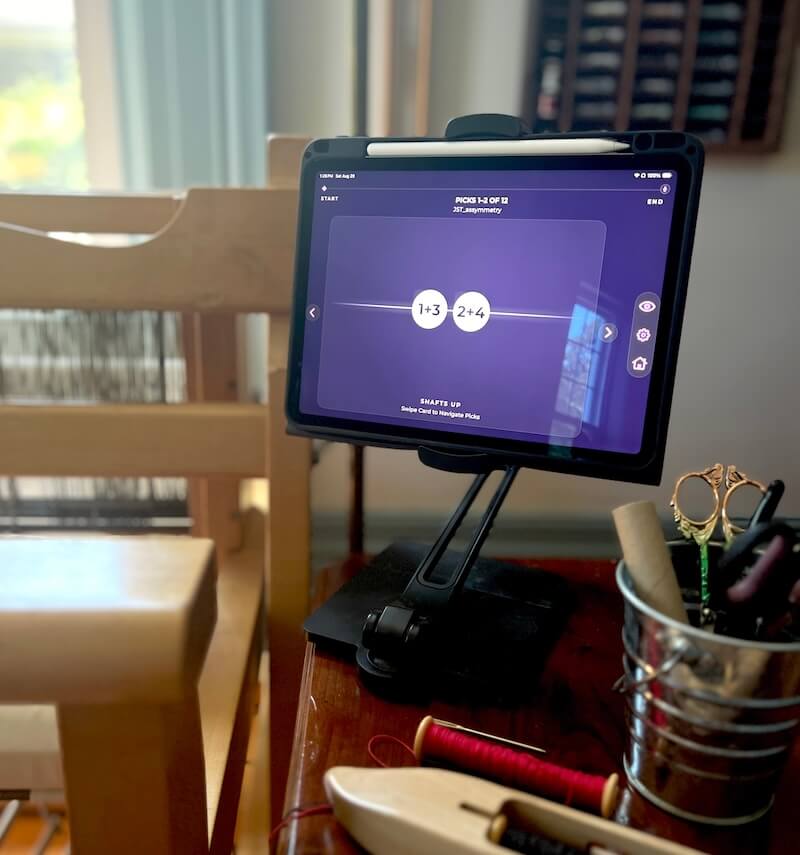
A weaving tracker is a tool that helps you keep your place while working through a weaving draft. It can be as simple as a pencil mark on a printed pattern, a sticky note, a row counter, or a physical treadle tracker. Digital weaving trackers put the same basic idea on a screen, helping you see what comes next and record where you are.
The primary focus is keeping your place at the loom. Following a draft step by step makes the physical work of winding, threading, and weaving much smoother, whether you design your own pattern or start from an imported WIF file.
Some weavers design their own drafts. Others start from a magazine pattern, a class project, a guild library, or a WIF file shared by a teacher or friend.
A weaving tracker fits either workflow. Once you have a draft, the work is following it through warping, threading, and weaving. WeavingGem lets you create or edit a draft in the app, or import a WIF, then helps you track each stage.
Follow the warp colour order from your WIF, with optional counting-thread and bout reminders while you wind.
How warping tracking worksWork through threading groups with yarn colour and shaft information visible, so you can dress the loom without constantly searching paper.
How threading tracking worksTrack the current treadle, shaft lift, or pick. Step forward, step back, and keep going when your draft repeats.
How weaving pick tracking worksTap or swipe on your iPhone or iPad, advance from Apple Watch, or say next and back with Voice Control. Use whichever input keeps your hands on the shuttle and the work.
Your progress saves on your device, so you can step away and pick up the same draft right where you left off.
I finally got the chance to start weaving with your app today. First off, I will say that I much prefer weaving with your app compared to what I was doing previously – which was printing out the pattern, taping it to my loom, and using a sticky note that I had to move line by line. Using WeavingGem is much more convenient for me.
Drafting is where you work out the structure: threading, tie-up, and treadling. WeavingGem gives you a touch canvas to build, edit, or tweak drafts directly on your iPad or iPhone, complete with instant cloth drawdown feedback.
Find patterns and drafts created by other weavers, designers, teachers, magazines, or weaving organizations.
Follow a draft step by step while you are doing the physical work of warping, threading, and weaving at the loom.
These tools work together. You can design a draft yourself, edit an existing one, or import a pattern from a library, then use a tracker to follow it through warping, threading, and weaving.
A weaving tracker is a tool that helps you keep your place while working through a weaving draft. WeavingGem is a digital weaving tracker for iPhone, iPad, and Apple Watch that turns WIF drafts into clear warping, threading, and weaving steps.
Yes. You can start a draft right in the app with Create Draft, or tap Edit pattern to change threading, tie-ups, or treadling on an existing pattern. Paint threading and weft picks directly on the canvas and watch the drawdown update. When you are ready to dress the loom, your changes carry straight into Warp, Thread, and Weave modes. Read the 1.5.0 update.
Yes. WeavingGem imports compatible WIF files from Files, AirDrop, email, or iCloud Drive. Most standard WIF drafts from teachers, guilds, and pattern sources work, though not every export format is supported.
Yes. Drafts and progress stay on your device. You do not need Wi-Fi or an account to weave with WeavingGem.
Yes. Open a draft and choose Warp to follow the warp colour order, Thread to work through threading groups, or Weave to track picks, treadles, or shaft lifts.
No. Physical methods like printed drafts, pencils, sticky notes, counters, and treadle trackers work well. A digital tracker is another option to keep your place.